Flapjack
latest

Getting started

  • Quickstart

Dealing with data

  • Projects & Data Formats
  • GOBii QTL Format
  • Pedigree Information
  • Favourable Alleles/Alt Marker Names
  • Import Data
  • Duplicate Markers
  • Export Data
  • Quick Export Data
  • Export Image

Visualizing genotypes

  • Genotype Visualization
  • Modes and Views
  • Selecting Lines and Markers
  • Show/Hide Lines
  • Show/Hide Markers
  • Filtering Markers
  • Chromosome Map Scaling
  • Colour Schemes
  • Customize Colours
  • Allele Frequency Threshold
  • Bookmarks
  • Toggle Visible Displays
  • Create New View
  • Database Link Settings
    • Genotype File Headers

Other visualizations

  • Chromosome Visualization
  • Phenotype Visualization
  • Select Traits
  • QTL Visualization
  • Filter QTLs
  • Graph Visualization

Analysis features

  • Find by Name
  • Sort Lines
  • Similarity Matrix Creation
  • Dendrogram Creation
  • Marker Assisted Back Crossing
  • Marker Assisted Back Crossing Tutorial
  • Pedigree Verification (F1s Known Parents)
  • Pedigree Verification (F1s Known Parents) Tutorial
  • Pedigree Verification Lines (parental contribution)
  • Pedigree Verification - Lines (parental contribution) Tutorial
  • Forward Breeding
  • Indexed Forward Breeding
  • Analysis Results Tables
  • Batch Analysis
  • Video Tutorials

Miscellaneous topics

  • Preferences
  • Tips and Shortcuts
  • Command Line Support
  • Allocating Memory
Flapjack
  • Docs »
  • Database Link Settings
  • Edit on GitHub

Database Link Settings

Use the Database Link Settings dialog (Data->query database->Settings) to set or update the URLs that Flapjack will use when attempting to query a remote database for line or marker information.
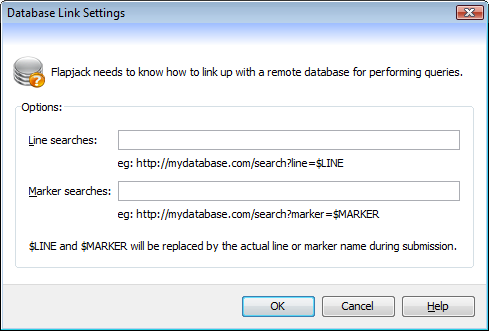
DatabaseSettingsDialog
  • Line searches - enter a valid URL containing a location that can be queried for information on a line, where $LINE will be replaced by the actual name of the line.
  • Marker searches - enter a valid URL containing a location that can be queried for information on a marker, where $MARKER will be replaced by the actual name of the line.

Genotype File Headers

Flapjack’s genotype file format supports headers for specifying Database Link Settings.

  • Line searches
    # fjDatabaseLineSearch = http://mydatabase.com/search?line=$LINE
    

    As above, enter a valid URL containing a location that can be queried for information on a line, where $LINE will be replaced by the actual name of the line.

  • Marker searches
    # fjDatabaseMarkerSearch = http://mydatabase.com/search?marker=$MARKER
    

    As above, enter a valid URL containing a location that can be queried for information on a marker, where $MARKER will be replaced by the actual name of the line.

Next Previous

© Copyright 2022, Information and Computational Sciences, The James Hutton Institute Revision 96e51500.

Built with Sphinx using a theme provided by Read the Docs.